How to Set Up Multiple Smart Garage Openers on One Wi-Fi


Published: Jun 15, 2026 | Updated: Jul 28, 2026

Suddenly, the dream of smart home simplicity can feel complicated. You find yourself asking: “Can I even control two garage doors from one app? Do I need to buy a whole new system?”

You’re in the right place. The answer is a resounding yes, and it’s easier than you think. This guide will walk you through everything you need to know, clearing up the confusion so you can get the seamless, one-app control you’ve been looking for.
Foundation: First, Let's Identify Your Setup


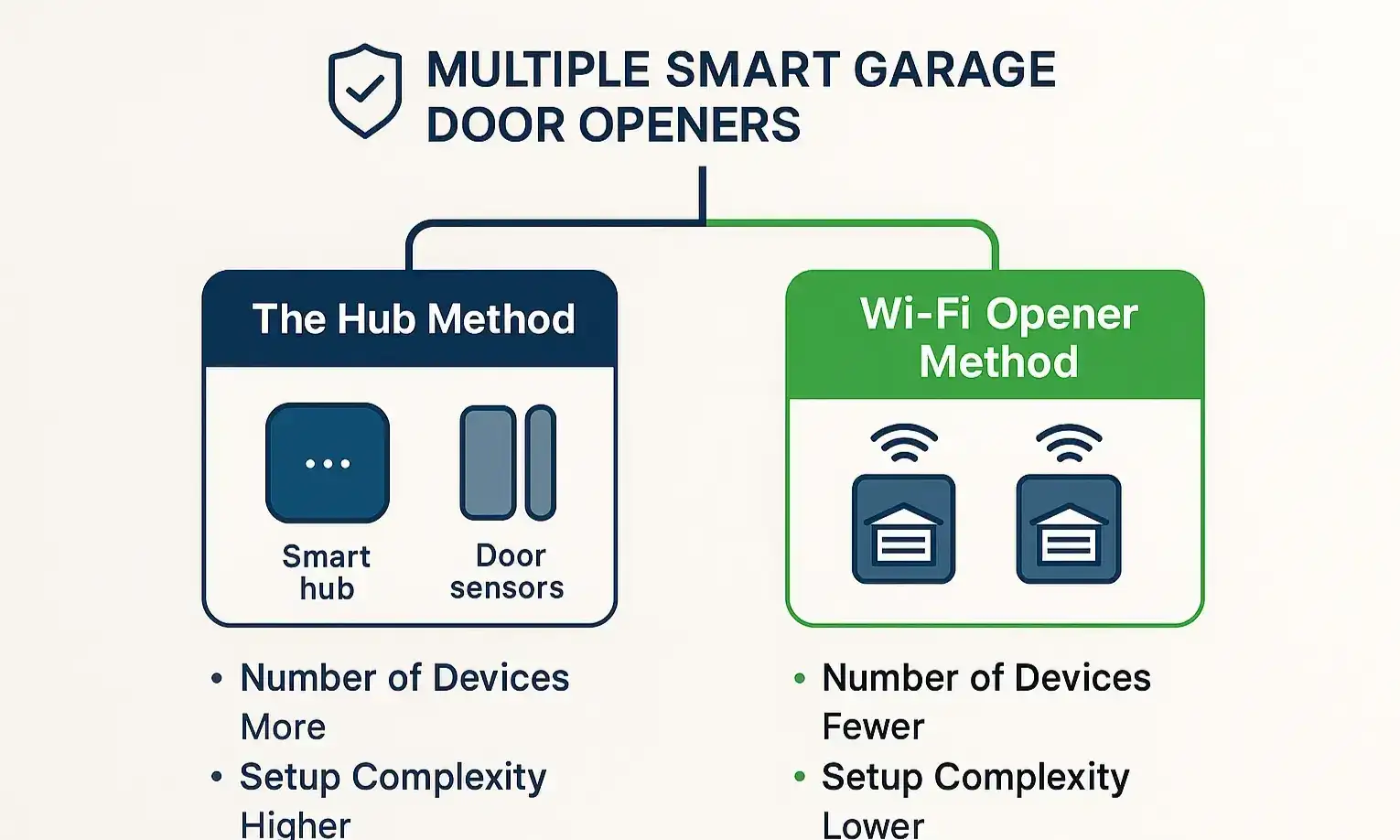
Identify your setup instantly with this clear flowchart comparing the Hub Method and the Wi-Fi Opener Method, helping you choose the right installation path.
Before you touch a single setting, the most important step is to understand what kind of hardware you’re working with. Getting this right from the start saves a massive amount of time and frustration. Nearly every setup issue stems from confusing these two scenarios.

There are two main ways to control multiple doors:

1. The Hub Method: You have one “smart hub” (like a MyQ Smart Garage Control) that acts as a bridge. This hub connects to your Wi-Fi and then communicates with your existing, non-smart garage door openers. To add a second door, you simply add a second door sensor.
2. The Wi-Fi Opener Method: You have two (or more) separate garage door openers that each have Wi-Fi technology built directly into the motor unit. There is no central hub needed; each opener connects to your home’s Wi-Fi network independently.

Once you know which path you’re on, the next steps become crystal clear.

Building: Your Step-by-Step Setup Guide


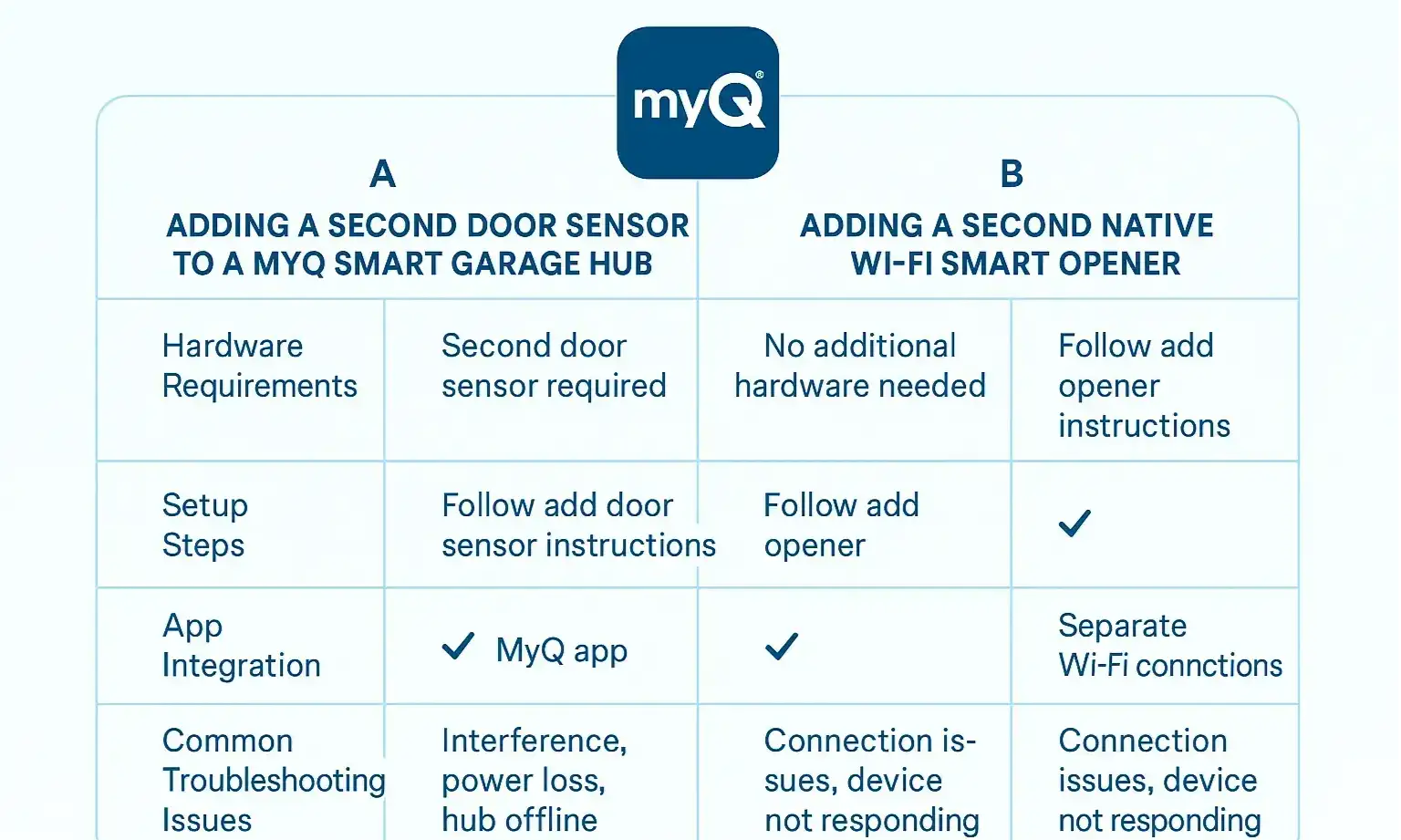
Compare the Hub Method and Wi-Fi Opener Method across setup, hardware, and troubleshooting to select the ideal solution for your smart garage doors.
Depending on your hardware, your setup process will be different. Below are the two distinct paths for getting your multi-door system online.

Path A: The Hub Method (Adding a Second Door Sensor)

If you have a smart hub like the MyQ Smart Garage Control, your first door is already set up. Adding the second involves pairing a new door sensor with your existing hub.

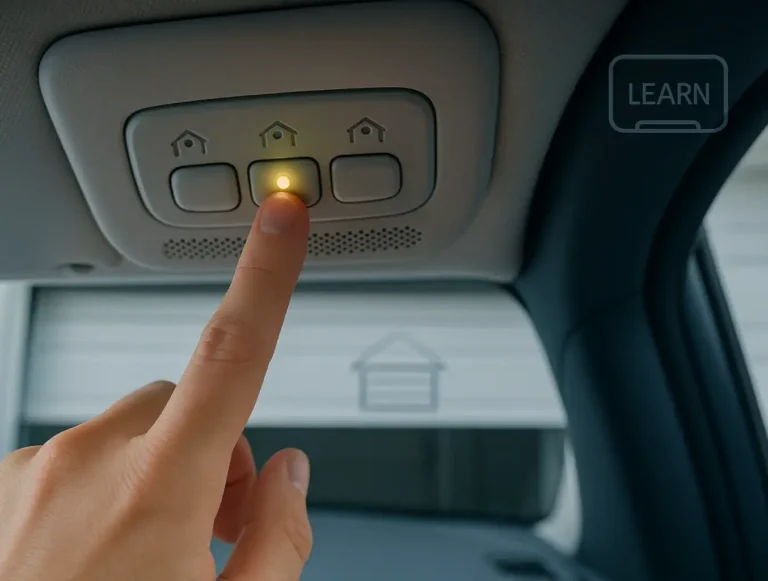
Common Mistake Callout: During this process, the app will pair the sensor to the hub. It will then guide you to press the “Learn” button on your second garage door opener motor. Do not press the learn button on the opener you’ve already set up. This can cause the hub to activate both doors simultaneously.

Path B: The Wi-Fi Opener Method (Adding a Second Smart Opener)

This method is often more straightforward because you’re simply adding another independent device to your account, much like adding another smart lightbulb to your home. The advantages of Wi-Fi enabled garage door openers often include a simpler setup process

Mastery: Pro-Tips for Multi-Door Management


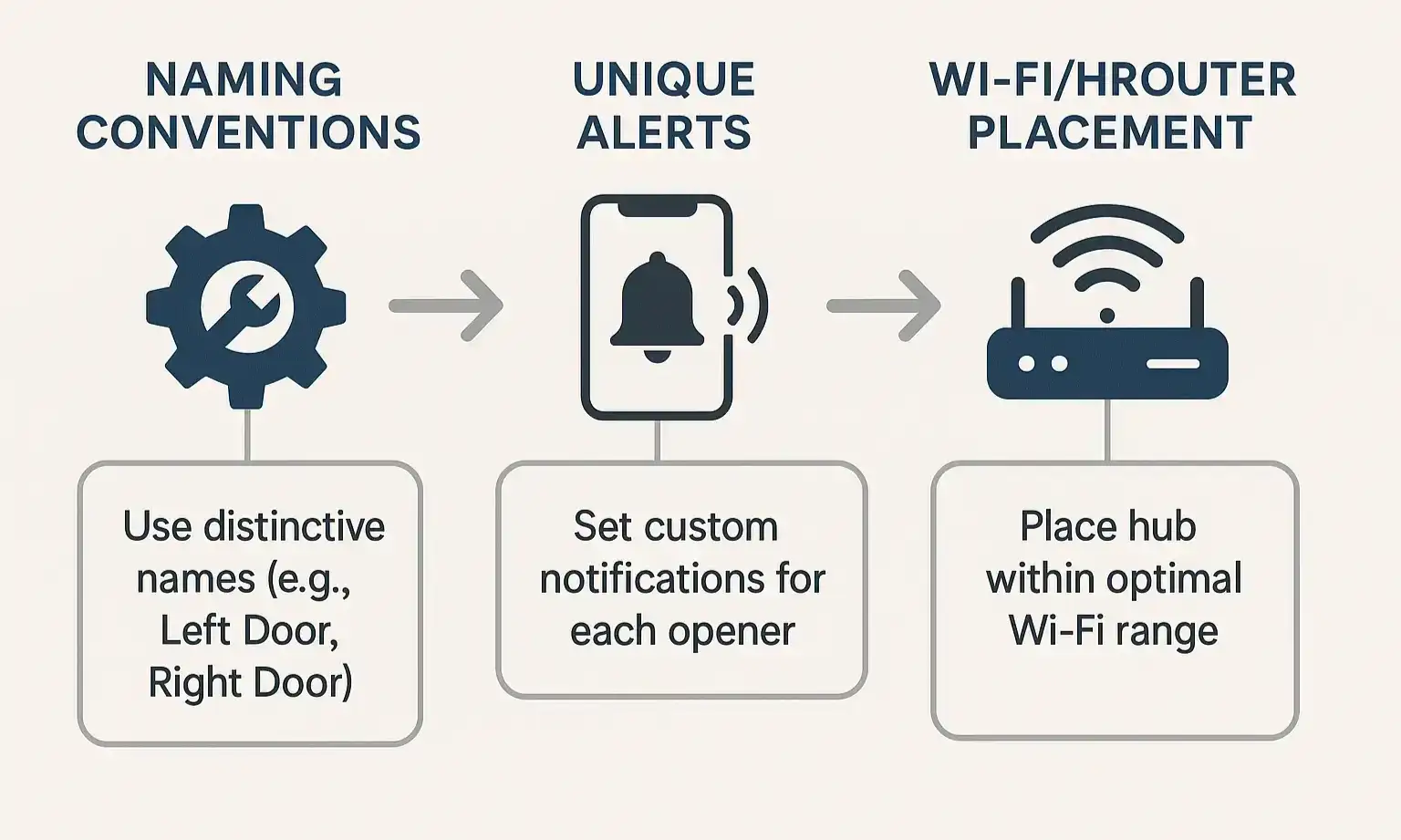
Optimize your smart garage setup with expert tips on naming, alerts, and Wi-Fi placement to ensure seamless multi-door management.
Getting your doors connected is the first step. Managing them effectively is the next. Here are a few tips to create a truly seamless experience.

Action: The Ultimate Troubleshooting Guide


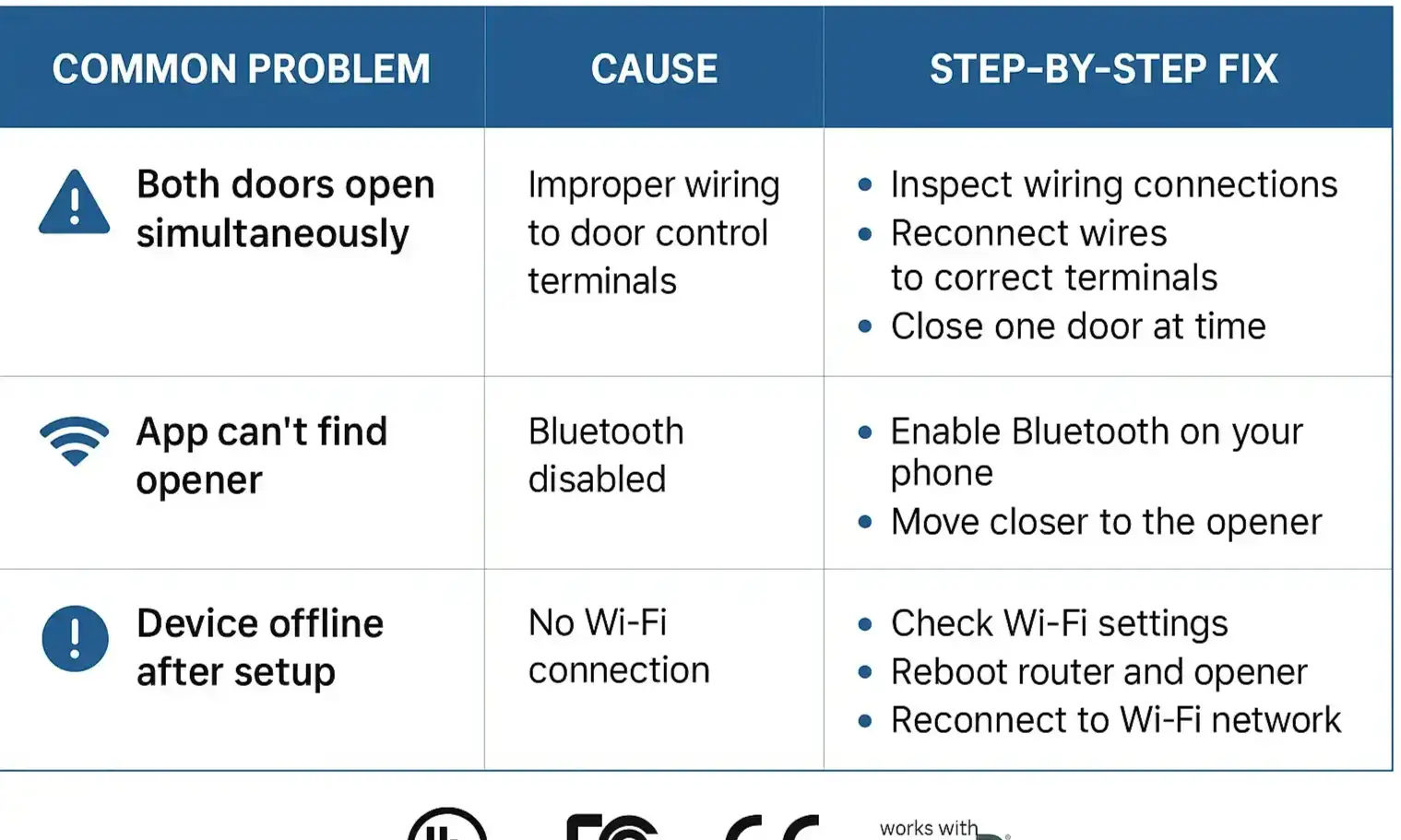
Resolve setup hurdles quickly with this comprehensive troubleshooting guide for multi-door smart garage openers.
Even with a perfect setup, you might run into a snag. Here are solutions to the most common multi-door problems.

Problem: Both of my garage doors open at the same time!

This is the most frequent issue with the Hub Method.

Problem: My second door sensor or opener keeps showing “Offline.”

Problem: The app can’t find my new Wi-Fi opener during setup.

Frequently Asked Questions


Can you have more than one garage door on the MyQ app?

Absolutely. The MyQ app is designed to handle multiple garage doors, whether they are connected via a single Smart Garage Control Hub with multiple sensors or are individual Wi-Fi-enabled openers.

How many doors can MyQ control?

A MyQ Smart Garage Hub can control up to two garage door openers. With the addition of a second door sensor, you can manage both from the app. If you are using MyQ-enabled Wi-Fi garage door openers, you can add up to 16 devices to your MyQ account.


What is a smart garage door opener?

A smart garage door opener is a device that connects to your home’s Wi-Fi network, allowing you to monitor, open, and close your garage door from anywhere using a smartphone app. It also provides features like activity alerts, scheduling, and integration with other smart home platforms.

Your Path to a Smarter Garage


Managing a multi-door garage doesn’t have to be a technical nightmare. By first identifying your hardware setup and then following the correct path, you can achieve streamlined control from a single app. You’ve now got the knowledge to not only set up your system but also to optimize and troubleshoot it like a pro.

If you find that your equipment is outdated or you’d rather have an expert handle the setup, exploring a professional garage door opener installation service can ensure everything works perfectly from day one.

Frequently Asked Questions


Can you have more than one garage door on the MyQ app?

Absolutely. The MyQ app is designed to handle multiple garage doors, whether they are connected via a single Smart Garage Control Hub with multiple sensors or are individual Wi-Fi-enabled openers.

How many doors can MyQ control?

A MyQ Smart Garage Hub can control up to two garage door openers. With the addition of a second door sensor, you can manage both from the app. If you are using MyQ-enabled Wi-Fi garage door openers, you can add up to 16 devices to your MyQ account.

What is a smart garage door opener?

A smart garage door opener is a device that connects to your home's Wi-Fi network, allowing you to monitor, open, and close your garage door from anywhere using a smartphone app. It also provides features like activity alerts, scheduling, and integration with other smart home platforms.

Contact / Request a Call