Programming Garage Door Remotes And Transmitters: The Complete Diagnostic Guide


Published: Jul 13, 2026 | Updated: Jul 28, 2026

Standing in a dusty garage balanced on a ladder while trying to program a replacement remote is a frustrating rite of passage for many homeowners. Often, user manuals are either missing or filled with overly technical jargon, leaving you guessing whether your hardware is even compatible.

Programming a remote control is not a guessing game—it is an exact science determined by radio frequencies, secure rolling codes, and hardware compatibility. This master guide provides clear, field-tested instructions to sync your remotes and clear system faults without the stress.
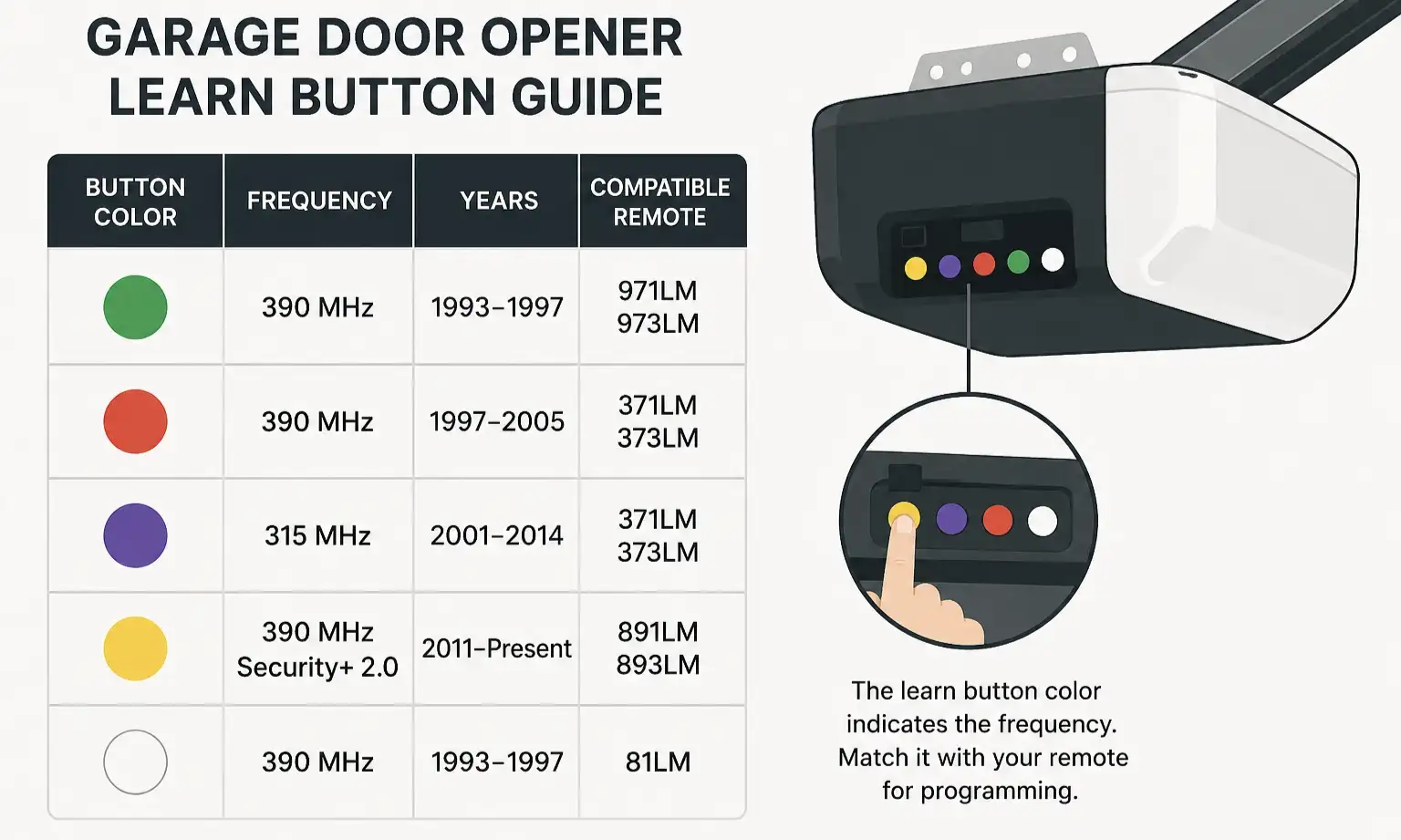
The Ultimate Learn Button & Frequency Matrix


Garage Door Opener Learn Button Guide
Before pressing any buttons, you must identify your system’s core architecture. Garage door openers operate on distinct radio frequency (RF) bands determined by their manufacturing era. To determine compatibility, look at the physical “Learn” button color on your overhead motor head. If the button is faded or dusty, you can identify it by matching the color of the thin antenna wire hanging from the unit location instantly.

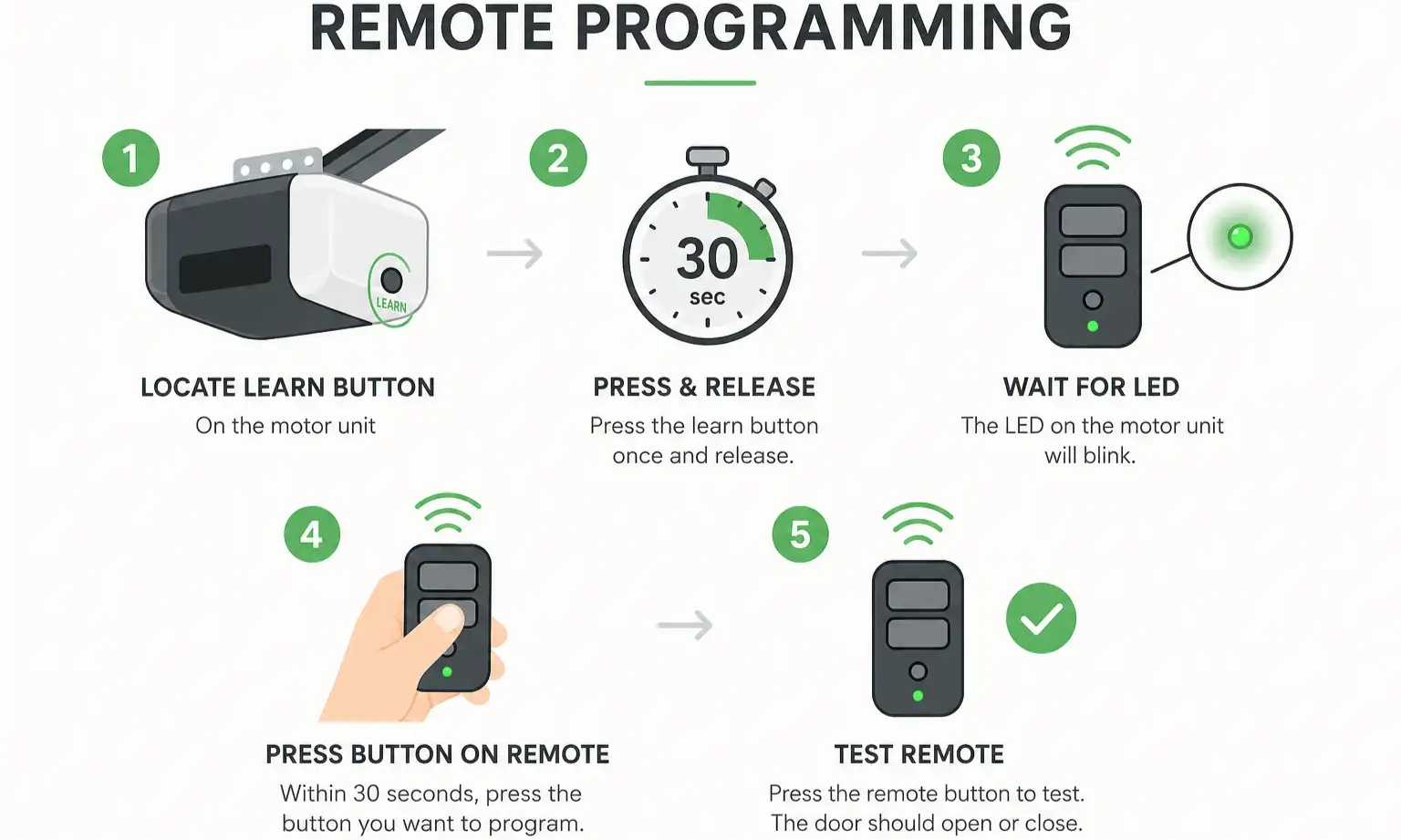
Step-by-Step: Standard Handheld Remote Programming


Transmitters Remote Programming
Programming standard, single-brand transmitters (such as LiftMaster, Chamberlain, Genie, or Craftsman) is straightforward if you adhere to strict timing rules.
If you already have a functional remote, you can bypass the ladder entirely. Read our detailed blueprint on how to program a garage door remote from another remote to duplicate settings directly.

Universal Remote Control Cheat Sheet


Universal remotes like the Chamberlain Clicker or Klik5U require a multi-press code to align with the specific carrier frequency of your garage receiver. If you need to know how to program a universal remote, follow this precise click-count sequence:

Open the remote casing to locate the program button. Press it until the status LED lights up.

Press your target remote button N times based on your opener’s Learn button color:

Press any other button on the transmitter to lock in the selection.

Press and release the “Learn” button on your motor, then press your programmed remote button to finalize the link.

Ladder-Free: Programming from the Wall Control Console


If your ceilings are high or climbing a ladder is not an option, you can program modern remotes from your hardwired wall console:

Security & System Reset: Memory Purging


When moving into a new home or dealing with lost remotes, you must clear old signals to prevent unauthorized access.

To execute a clean system reset:

1. Press and hold the “Learn” button on the motor unit for exactly 6 seconds. The LED will turn off, indicating all hand-held transmitters and keyless entry PINs are erased.

2. For Yellow Button systems with MyQ smart integrations, press and hold the button a second time for 6 seconds to wipe network settings.

If you need to perform a comprehensive factory reboot, review our complete guide on how to reset garage door opener systems safely.

Advanced Troubleshooting: The "Silent Failures" Diagnostic


When programming attempts fail repeatedly, invisible interference is usually to blame.

Vehicle Integration: HomeLink & Car Programming


Programming your vehicle’s integrated buttons is a simple, two-stage process:

1. Teach the Car: Hold your existing handheld remote within two inches of your car’s built-in HomeLink button. Press and hold both buttons simultaneously until your vehicle’s indicator light flashes rapidly.

2. Sync with the Motor: Press the “Learn” button on your opener, then return to your car and press the designated HomeLink button three times to complete the connection.

If your vehicle’s internal system is outdated or fails to communicate with your newer motor, check out our guide on car garage door opener hardware standards or read our troubleshooting steps on how to program garage door opener in car without remote to resolve transceiver issues.

FAQ


Can garage remotes be duplicated?

Yes. If you want to avoid scaling a ladder, cloning garage door remote devices allows you to copy RF signals directly from a working transmitter to a new cloning remote.

Why won’t my remote sync despite pressing the button?

The most common cause is a full receiver memory, active “Lock” mode on the wall button, or RF interference from nearby electronics.

How do I know if my logic board is burnt out?

If the “Learn” button LED does not light up at all when pressed, or if it blinks a repeating pattern (such as 5 consecutive blinks), your internal receiver card may have suffered power surge damage. In these cases, professional liftmaster garage door repair is recommended.

Frequently Asked Questions


How do I program a new garage door remote transmitter?

Locate the Learn button on your garage door opener motor unit (usually on the back or side panel). Press and immediately release the Learn button so the indicator light glows steadily. Within 30 seconds, press and hold the button on your handheld remote transmitter until the opener lights flash or you hear two clicks, confirming the sync.

Why is my garage door remote not syncing with the opener?

The most common causes for failed programming are a weak or dead battery in the remote transmitter, attempting to program from too far away, or radio frequency (RF) interference from nearby LED light bulbs or electronics. Ensure your remote is on the correct frequency for your specific opener brand.

How do I know if an aftermarket or universal remote is compatible with my garage door?

Check the color of the Learn button on your garage door motor unit (common colors include yellow, purple, orange/red, and green) and check it against the compatibility guide for the transmitter. Most modern remotes support major brands like LiftMaster, Chamberlain, Genie, and Craftsman manufactured after 1993.

Can I program multiple remotes to a single garage door opener?

Yes, most residential garage door openers can store between 5 and 8 remote transmitters or keypad codes in their onboard memory. To add additional remotes, simply repeat the Learn button programming process for each individual device.

How do I reset or erase all programmed garage door remotes from memory?

To wipe all synced remotes and transmitters from your opener's memory, press and hold the Learn button on the motor unit for approximately 6 to 10 seconds until the indicator light turns off. Once cleared, you will need to reprogram any remotes or keypads you wish to continue using.

Contact / Request a Call