Have you ever found yourself juggling a collection of remotes for different garage doors? Or maybe you’ve faced the frustration of a lost or broken remote, only to be daunted by the prospect of programming a new one. It feels like a task that should be simple, but the fragmented instructions and confusing jargon found online often turn it into a headache.
You’re not alone. Many homeowners get stuck trying to sync a new universal remote, running back and forth from the garage to their computer, piecing together advice from forums and clunky manufacturer websites.
What if you could skip all that? This guide is your single, all-in-one resource. We’re going to walk through this process together, step-by-step, transforming industry jargon into plain English and highlighting the common pitfalls before you encounter them. Let’s make this simple.
Programming a Universal Garage Door Remote
Published: Jun 3, 2026 | Updated: Jul 28, 2026
Foundation: Will This Work for You? The 2-Minute Compatibility Check
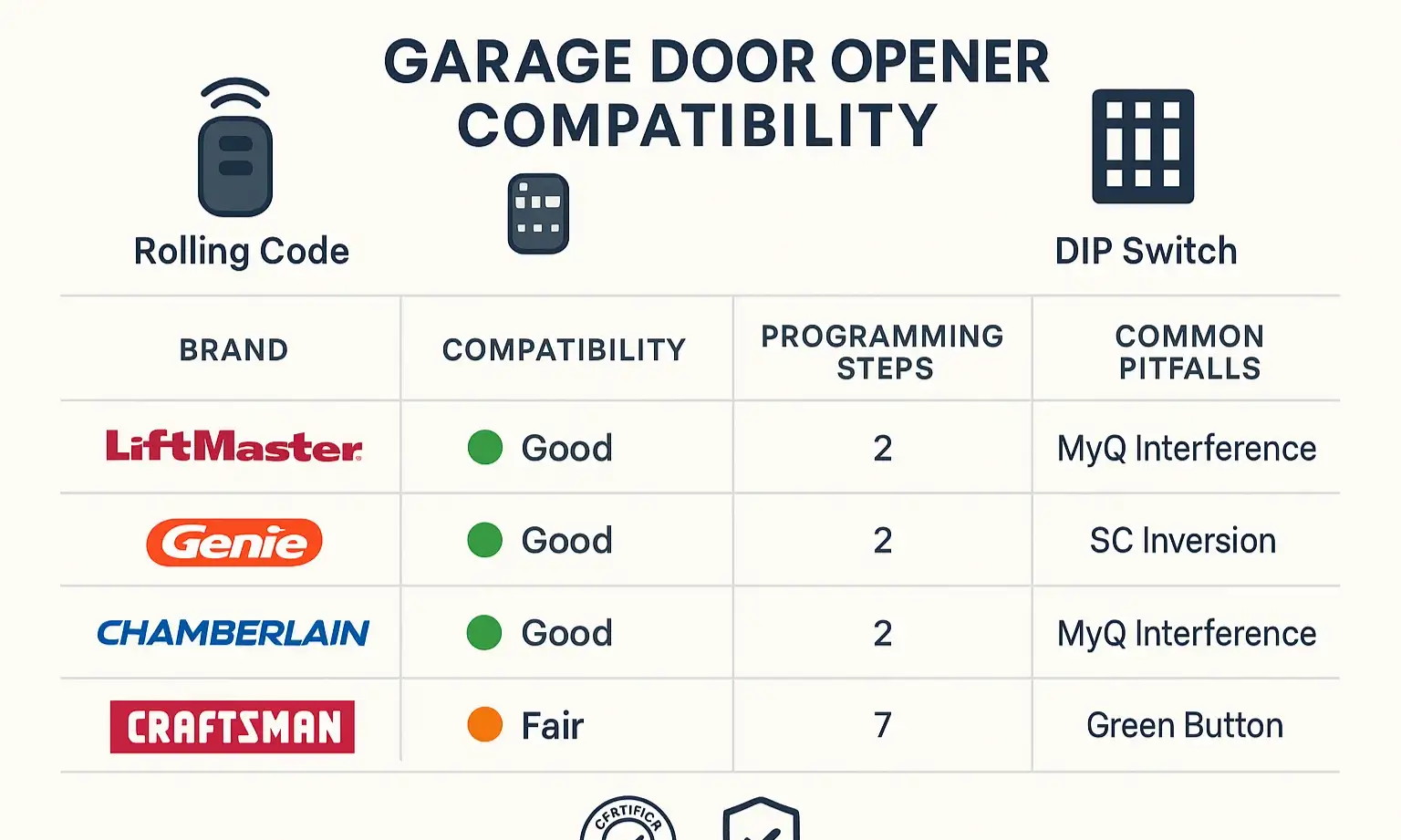
Before you press a single button, the most important step is ensuring your new universal remote can actually “talk” to your existing garage door opener. The primary reason programming fails is an overlooked incompatibility.
Most issues boil down to two types of security technology:
So, how do you know what you have? The easiest way is to check the packaging of your universal remote or consult a compatibility chart. Most modern universal remotes are designed to work with the major rolling code brands from the last 20-30 years.
If your opener is a major brand like Chamberlain, Genie, or LiftMaster, your chances of compatibility are very high. If you’re unsure, a quick search for your opener’s model number will usually tell you which technology it uses.
If your opener is a major brand like Chamberlain, Genie, or LiftMaster, your chances of compatibility are very high. If you’re unsure, a quick search for your opener’s model number will usually tell you which technology it uses.
The 5-Step Universal Programming Method
Once you’ve confirmed compatibility, you’re ready to sync your remotes. The goal is to teach your garage door opener motor to recognize the new remote’s signal. For this, you’ll need a ladder, your new universal remote, and your existing, working brand-specific remote.
Step 1: Prepare Your Remotes
First, ensure your new universal remote is ready. This often involves a preliminary step to tell the remote which brand of opener it will be communicating with. Consult your universal remote’s manual for a list of brand codes. You’ll typically press and hold a “program” button, enter the numeric code for your opener brand (e.g., Chamberlain, Genie), and see an LED light confirm the selection.
Step 2: Locate the “Learn” Button on Your Opener
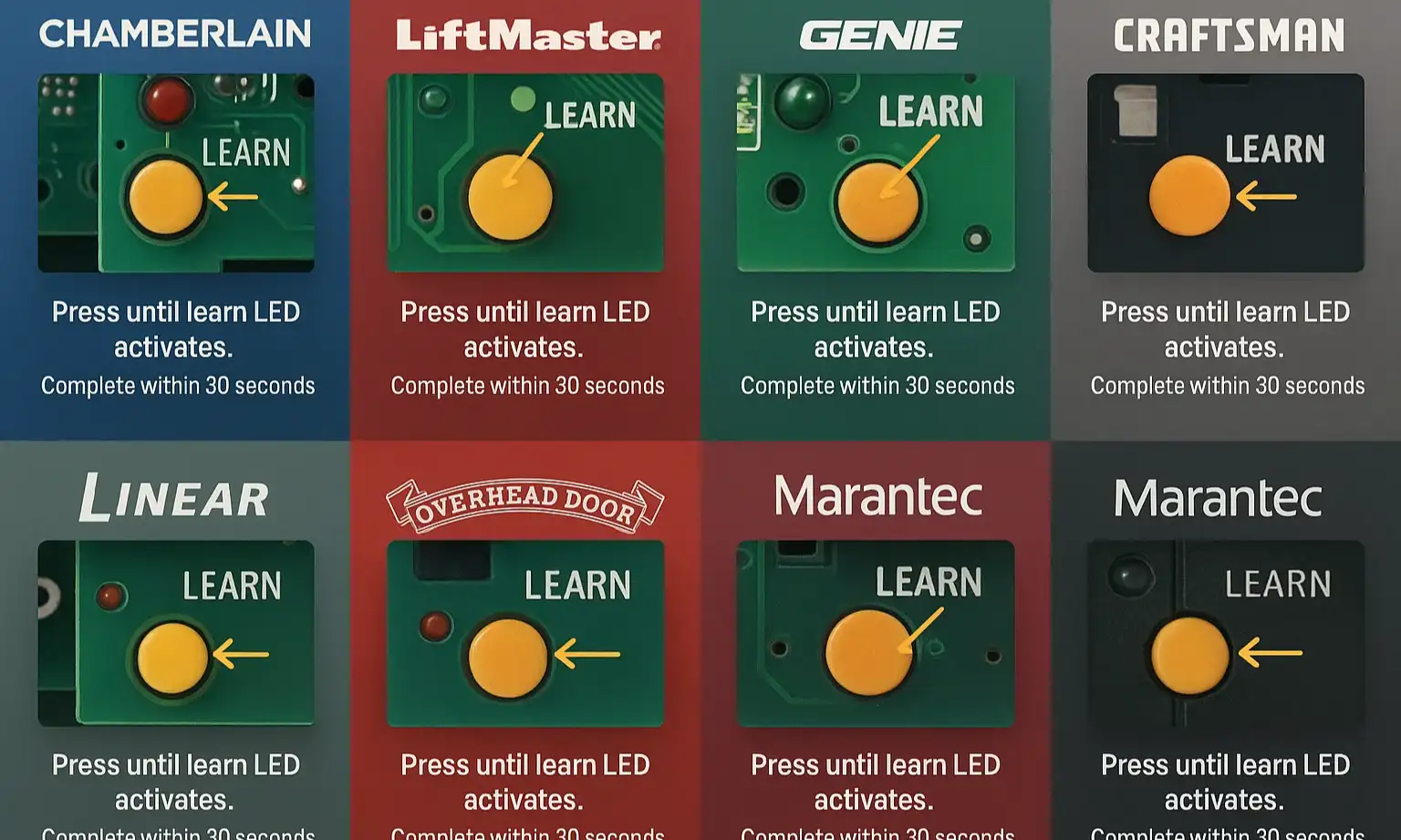
This is the most critical part of the process. The “Learn” or “Program” button is physically located on the motor unit of your garage door opener—the box that’s mounted to your garage ceiling. It’s usually a small, square button next to an LED light. The color of the button often indicates the brand or technology type (e.g., purple, red/orange, green).
Don’t spend ages hunting for it. Use this visual guide to get familiar with common locations.
Step 3: Put the Opener in “Learn” Mode
Press and immediately release the “Learn” button on the motor unit. Do not hold it down! Holding it down for too long (over 6 seconds) can erase the memory of all your remotes and keypads. You’ll know you did it right when the LED indicator light next to the button either stays lit or starts blinking.
Step 4: The 30-Second Window (The “Aha” Moment)
This is where most people go wrong. Once the “Learn” light is on, you have approximately 30 seconds to complete the next step. If you wait too long, the opener will exit programming mode, and your remote won’t sync.
Within that 30-second window, press and hold the button on your new universal remote that you want to use to open the door.
Step 5: Confirm the Connection
Keep holding the button on your remote. You are looking for a confirmation from the garage door opener. This will usually be:
Once you see or hear that confirmation, release the button on your remote. The programming should now be complete. Step off the ladder and give your new remote a test press. The door should operate. If it does, congratulations! If not, don’t worry—the next section is for you. If you find the garage door remote not working after multiple attempts, there might be another issue at play.
Advanced Programming & Troubleshooting
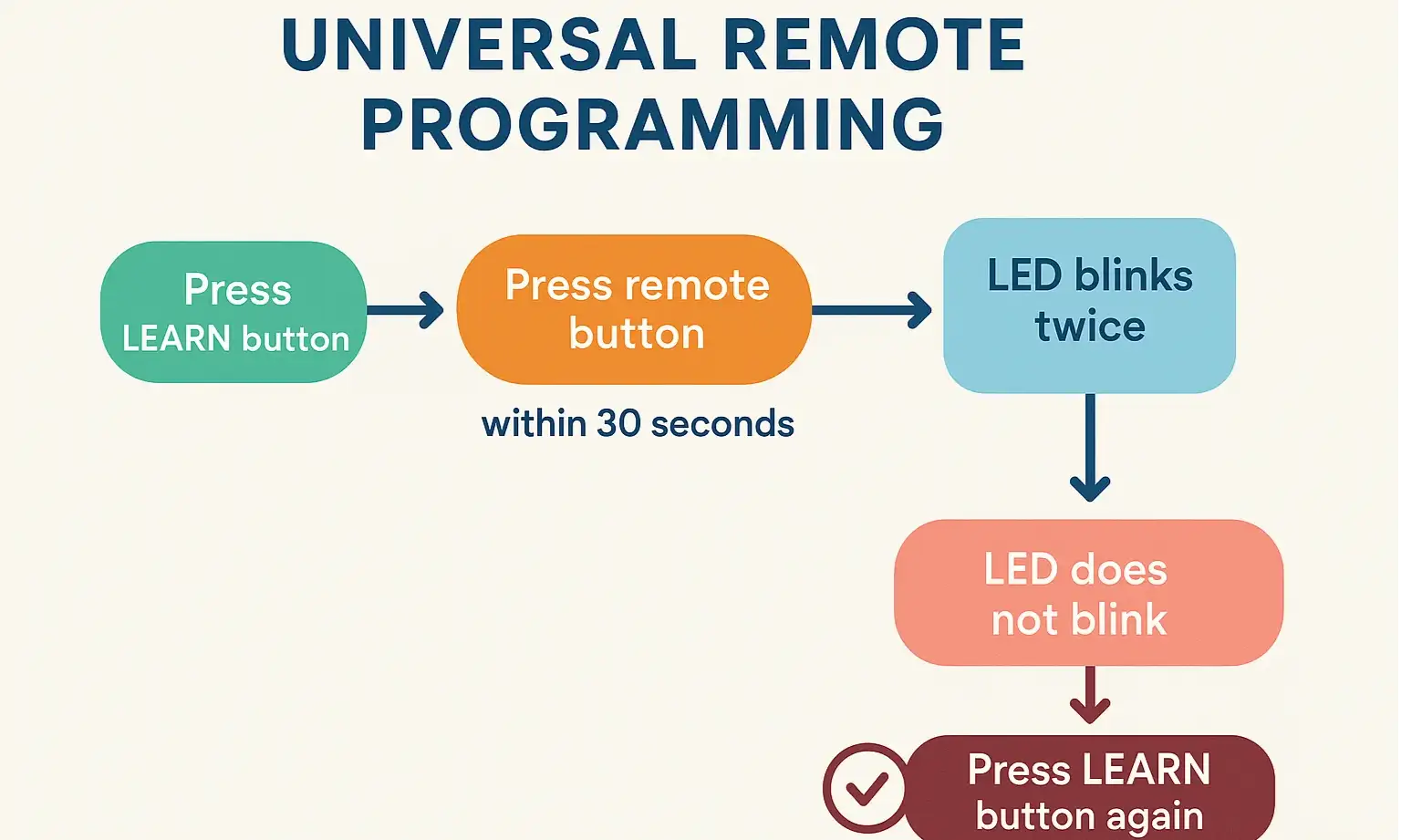
Sometimes, things don’t go perfectly on the first try. This is normal, especially with the sheer number of remote and opener combinations out there. If you’re stuck, this troubleshooting roadmap will help you diagnose the problem.
Common Problem #1: The Remote Won’t Sync at All.
Common Problem #2: The Remote Works, But Only When I’m Right Next to the Motor.
Action: Your Quick-Reference Programming Guide
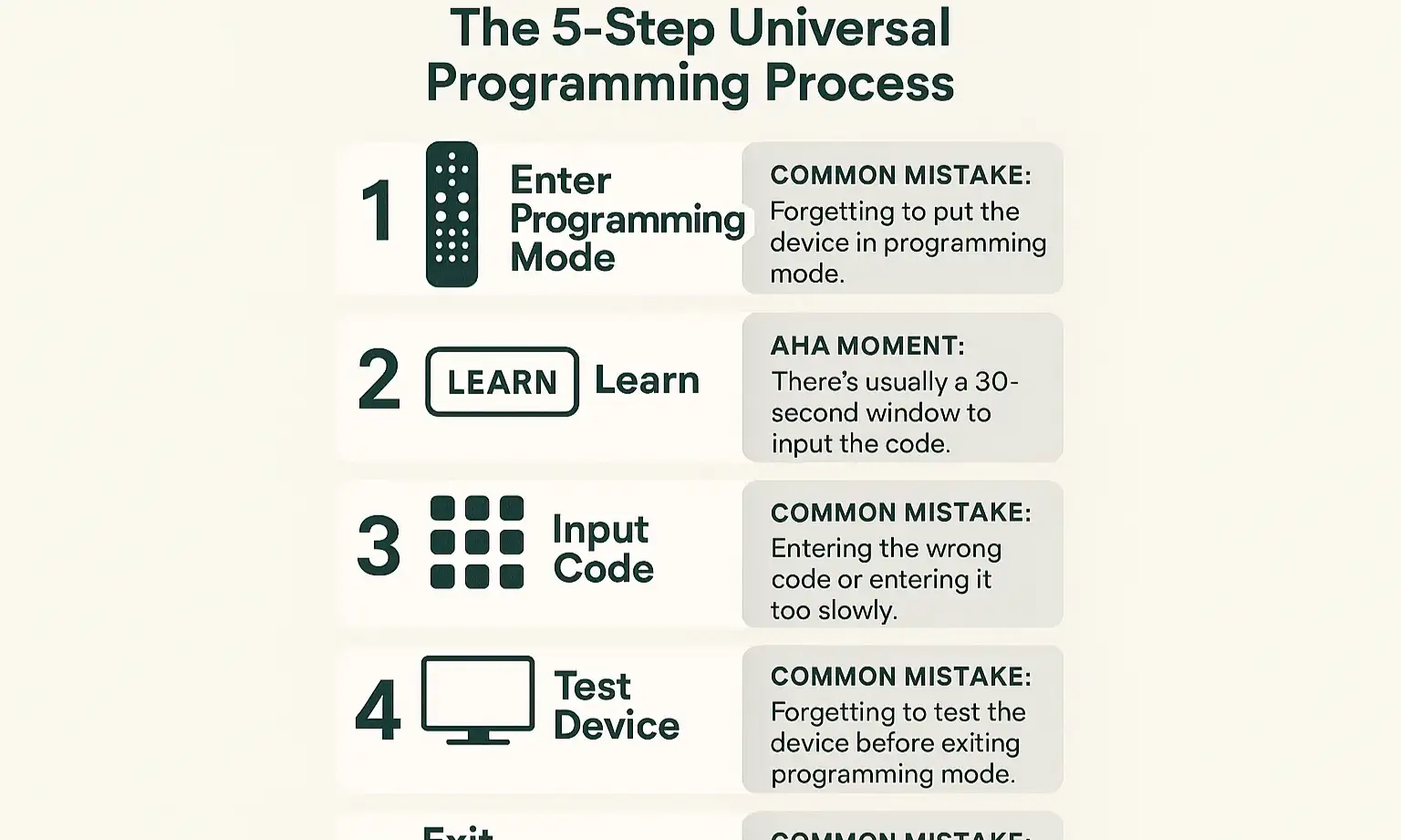
Projects in the garage can be messy. Instead of bringing your phone or laptop up the ladder, use this simple checklist to stay on track.
Frequently Asked Questions (FAQ)
Can you program a garage door remote from another remote without touching the opener?
For most modern systems with rolling code technology, you cannot. The security feature requires pressing the “Learn” button on the motor unit to authorize a new device. However, some specific models and brands have a “program from remote” feature, but this is not the universal standard. Following a specific guide on how to program a garage door remote from another remote is your best bet for those niche cases.
Why won’t my car’s built-in garage opener program?
Programming the built-in HomeLink or Car2U system in your vehicle follows a similar, but slightly different, process. It often involves using your existing remote to “teach” the car first, and then pressing the “Learn” button on the opener to sync the car. If your car garage opener is not working, it’s often due to skipping one of these two crucial steps.
Will a universal remote work on any garage door opener?
No, not all of them. While they are designed to work with a vast majority of openers made in the last 20-30 years, they may not be compatible with very old models (especially those with dip switches) or some obscure off-brands. Always check the compatibility chart before purchasing.
How do I know if my garage door opener uses rolling code?
A good rule of thumb is the manufacture date. If your opener was made after 1993, it almost certainly uses rolling code technology. Another clue is the absence of tiny dip switches inside your original remote’s battery compartment.
By following these steps and understanding the “why” behind them, you’re now equipped to tackle this project with confidence. You’ve learned how to check compatibility, the critical role of the “Learn” button, and how to troubleshoot the most common issues that leave others frustrated.
Frequently Asked Questions
Can you program a garage door remote from another remote without touching the opener?
For most modern systems with rolling code technology, you cannot. The security feature requires pressing the "Learn" button on the motor unit to authorize a new device. However, some specific models and brands have a "program from remote" feature, but this is not the universal standard. Following a specific guide on how to program a garage door remote from another remote is your best bet for those niche cases.
Why won't my car's built-in garage opener program?
Programming the built-in HomeLink or Car2U system in your vehicle follows a similar, but slightly different, process. It often involves using your existing remote to "teach" the car first, and then pressing the "Learn" button on the opener to sync the car. If your car garage opener is not working, it's often due to skipping one of these two crucial steps.
Will a universal remote work on any garage door opener?
No, not all of them. While they are designed to work with a vast majority of openers made in the last 20-30 years, they may not be compatible with very old models (especially those with dip switches) or some obscure off-brands. Always check the compatibility chart before purchasing.
How do I know if my garage door opener uses rolling code?
A good rule of thumb is the manufacture date. If your opener was made after 1993, it almost certainly uses rolling code technology. Another clue is the absence of tiny dip switches inside your original remote's battery compartment.