You slide into your driver’s seat, ready to head out. You press that convenient, built-in button on your car’s visor—the one that’s supposed to open the garage door—and… nothing. You press it again. Still nothing.
If you’ve ever found yourself in this frustrating scenario, you’re not alone. The promise of seamless integration between your car and your garage often hits a roadblock of confusing technology. But what feels like a complicated technical problem usually comes down to a simple communication gap.
This guide is here to be your translator. We’ll demystify the technology, help you diagnose the exact problem in minutes, and give you a clear path to getting that button working as it should.
Car-to-Garage Door Opener Compatibility Guide
Published: May 25, 2026 | Updated: Jul 28, 2026
First, What System Is In Your Car? HomeLink vs. Car2U
Before diving into programming, you need to know what system your vehicle uses. Think of them as the two major “languages” cars use to talk to garage door openers.
Knowing which system you have is the first step, as their programming methods can differ slightly.
The Compatibility Check: Your First Step to Success
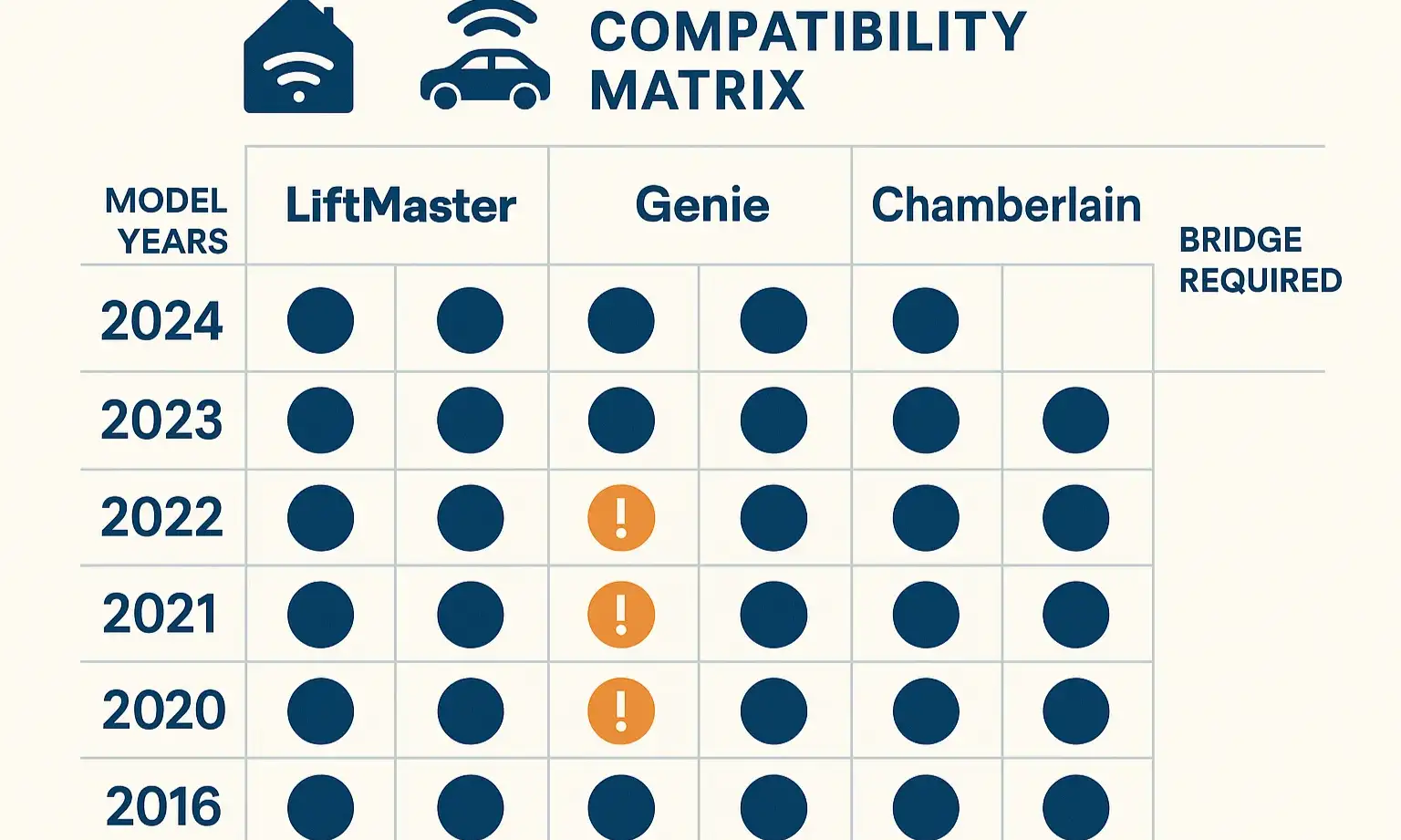
Programming a car’s remote isn’t just about following steps; it’s about knowing if your two devices are compatible from the start. Before you spend another minute pressing buttons, run through this quick mental checklist:
The combination of these three answers will tell you almost everything you need to know about what’s required to make them work together.
The "Aha" Moment: Why Your New Opener Won't Talk to Your Car
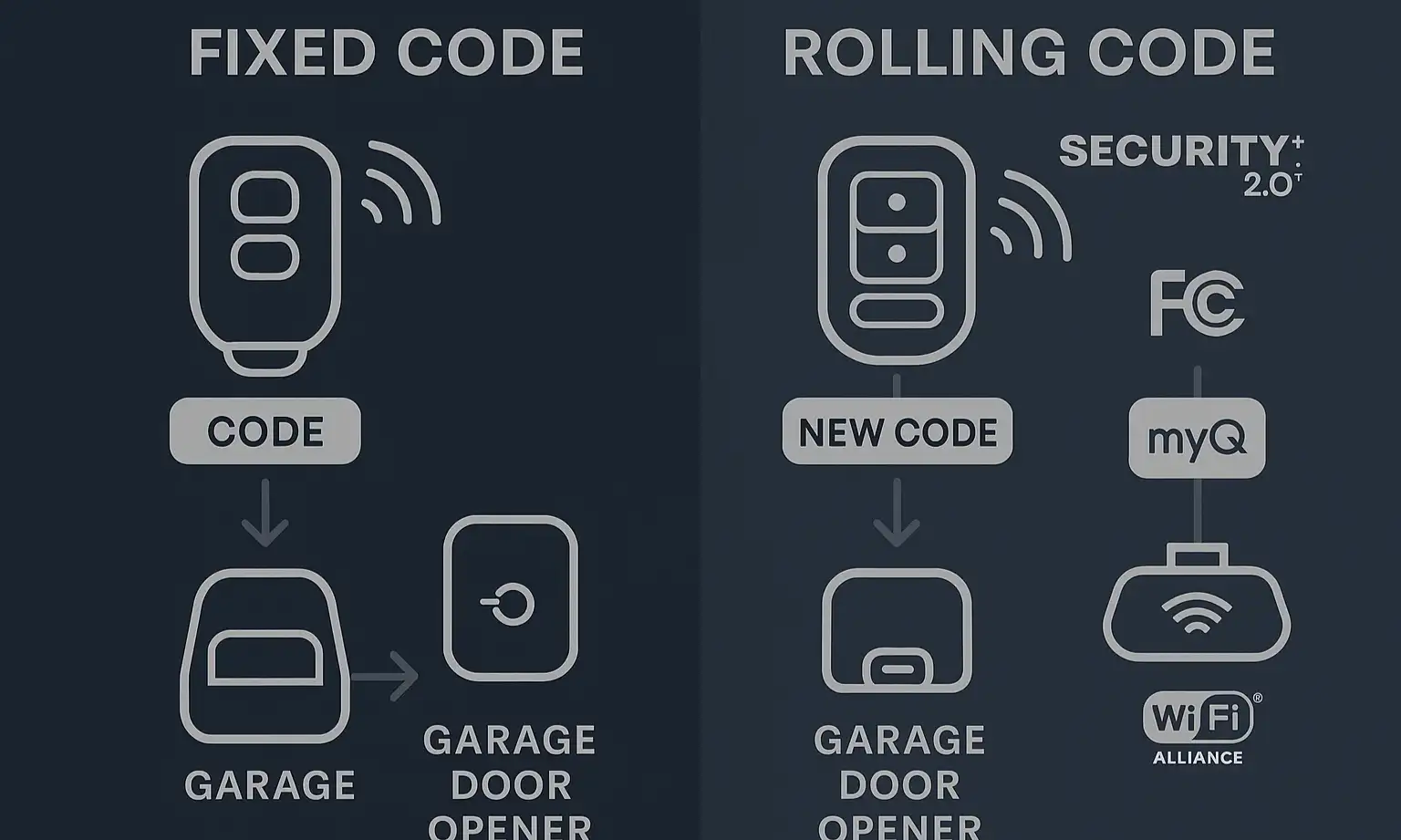
Here’s the single biggest reason for programming failure: your garage door opener is too secure for your car’s built-in remote system.
It sounds strange, but it’s true. Since the early 1990s, garage door openers have used “rolling code” technology. This means every time you press your remote, it sends a brand-new, unique code to the opener. It’s a fantastic security feature that prevents thieves from capturing your signal.
However, in the last decade, major brands like LiftMaster and Chamberlain introduced an even more advanced version called Security+ 2.0® (often associated with MyQ smart technology). This new system uses a more complex signal that older HomeLink and Car2U systems, typically found in vehicles made before 2012, simply can’t replicate.
The “Aha” Moment: Trying to program an older car with a new Security+ 2.0® opener is like trying to play a Blu-ray disc in a DVD player. The player (your car) doesn’t understand the new format of the disc (your opener).
However, in the last decade, major brands like LiftMaster and Chamberlain introduced an even more advanced version called Security+ 2.0® (often associated with MyQ smart technology). This new system uses a more complex signal that older HomeLink and Car2U systems, typically found in vehicles made before 2012, simply can’t replicate.
The “Aha” Moment: Trying to program an older car with a new Security+ 2.0® opener is like trying to play a Blu-ray disc in a DVD player. The player (your car) doesn’t understand the new format of the disc (your opener).
Decode Your Opener: The Learn Button Color Code
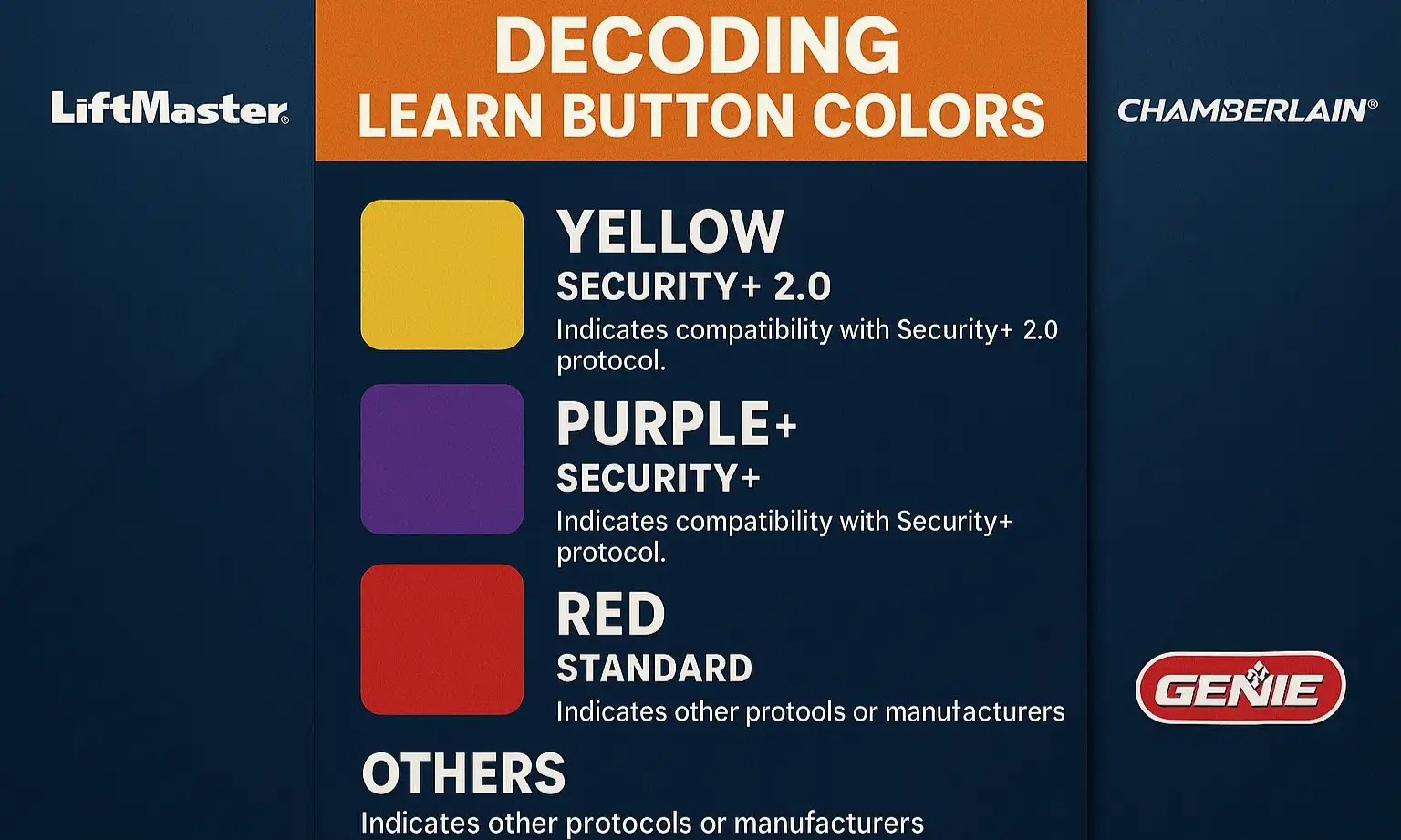
So, how can you tell if you have this advanced security? It’s surprisingly simple. The manufacturers placed a color-coded “Learn” button on the motor unit itself. This button is your key to understanding the technology you’re working with.
If you’re wondering where is the learn button on garage door opener, it’s typically on the back or side of the motor unit, often near a small LED light.
Here’s what the colors mean for LiftMaster and Chamberlain models:
Here’s what the colors mean for LiftMaster and Chamberlain models:
Genie openers use a similar system, with their Learn button helping to identify the Intellicode® security version.
The Solution: The Compatibility Bridge
If you’ve discovered you have a “Blu-ray” opener and a “DVD” car, the solution is a Compatibility Bridge (sometimes called a repeater).
This small device plugs into a standard power outlet in your garage. It acts as a translator:
The Solution: The Compatibility Bridge
If you’ve discovered you have a “Blu-ray” opener and a “DVD” car, the solution is a Compatibility Bridge (sometimes called a repeater).
This small device plugs into a standard power outlet in your garage. It acts as a translator:
The Ultimate Programming Roadmap
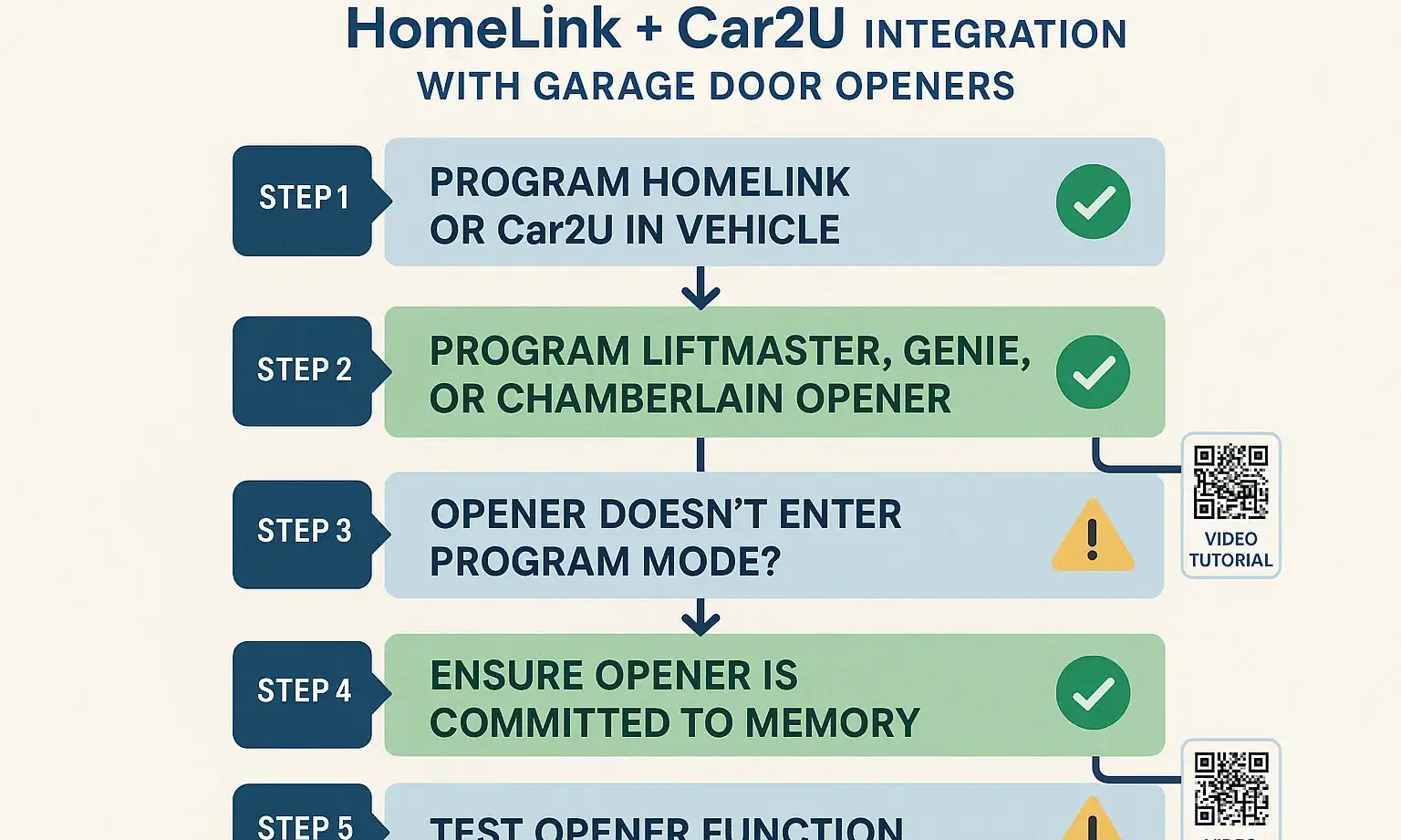
Whether you need a bridge or not, the programming process follows a similar pattern. Here is a general guide.
Important Note: Always consult your vehicle’s and garage door opener’s manuals first. These steps are a general guide, and specifics can vary.
Important Note: Always consult your vehicle’s and garage door opener’s manuals first. These steps are a general guide, and specifics can vary.
1. Prepare for Programming: Park your car outside the garage, pointing toward the door. Grab your current, working garage door remote.
2. Clear Car’s Memory: Most systems require you to clear any old codes first. Typically, this involves pressing and holding the two outer buttons on your car’s visor remote for about 20 seconds until the indicator light changes (e.g., flashes rapidly).
3. Train the Car: Hold your handheld remote 1-3 inches from the in-car button you want to program. Press and hold both the button on your handheld remote and the button in your car simultaneously. The indicator light in your car should change from a slow blink to a rapid blink. This means it has learned the basic signal from your remote.
4. Activate the “Learn” Button: This is the crucial step for rolling code systems. You’ll need a ladder. Press and immediately release the “Learn” button on your garage door opener motor. You’ll usually have only 30 seconds to complete the next step.
2. Clear Car’s Memory: Most systems require you to clear any old codes first. Typically, this involves pressing and holding the two outer buttons on your car’s visor remote for about 20 seconds until the indicator light changes (e.g., flashes rapidly).
3. Train the Car: Hold your handheld remote 1-3 inches from the in-car button you want to program. Press and hold both the button on your handheld remote and the button in your car simultaneously. The indicator light in your car should change from a slow blink to a rapid blink. This means it has learned the basic signal from your remote.
4. Activate the “Learn” Button: This is the crucial step for rolling code systems. You’ll need a ladder. Press and immediately release the “Learn” button on your garage door opener motor. You’ll usually have only 30 seconds to complete the next step.
5. Finalize the Sync: Return to your car and press and hold the button you were just programming for a few seconds, then release. Repeat this process (press, hold, release) two or three times. One of the presses should make the garage door move.
If the door moves, congratulations! You’re all set. If it doesn’t, it’s time for some quick troubleshooting.
If the door moves, congratulations! You’re all set. If it doesn’t, it’s time for some quick troubleshooting.
Troubleshooting Common Glitches
Sometimes, even when you do everything right, you can hit a snag. If your car garage door opener not working after following the steps, here are the most common culprits.
Symptom: The indicator light in your car never changes to a rapid flash in Step 3.
Solution: The battery in your handheld remote might be weak. Try a fresh battery. Also, experiment with holding the remote at different distances and angles from your car’s button.
Symptom: Your car’s light flashes rapidly in Step 3, but the door never moves in Step 5.
Solution: This is the classic sign of the Security+ 2.0® compatibility issue. You successfully cloned the remote’s signal, but the opener doesn’t recognize the final sync from your car. You likely need a compatibility bridge.
Symptom: It used to work perfectly, but now it’s stopped.
Solution: This can be caused by radio frequency interference. Believe it or not, certain low-quality LED light bulbs can emit frequencies that block your remote’s signal. Try operating it with the garage lights off. If that doesn’t work, clearing the memory on both the car and the opener and reprogramming from scratch can often fix it. For persistent issues, it might be time for a professional diagnosis, like a LiftMaster garage door repair service.
Solution: The battery in your handheld remote might be weak. Try a fresh battery. Also, experiment with holding the remote at different distances and angles from your car’s button.
Symptom: Your car’s light flashes rapidly in Step 3, but the door never moves in Step 5.
Solution: This is the classic sign of the Security+ 2.0® compatibility issue. You successfully cloned the remote’s signal, but the opener doesn’t recognize the final sync from your car. You likely need a compatibility bridge.
Symptom: It used to work perfectly, but now it’s stopped.
Solution: This can be caused by radio frequency interference. Believe it or not, certain low-quality LED light bulbs can emit frequencies that block your remote’s signal. Try operating it with the garage lights off. If that doesn’t work, clearing the memory on both the car and the opener and reprogramming from scratch can often fix it. For persistent issues, it might be time for a professional diagnosis, like a LiftMaster garage door repair service.
Frequently Asked Questions (FAQ)
Are all garage door openers compatible with HomeLink?
No. While HomeLink is compatible with the vast majority of openers, the introduction of Security+ 2.0® created a compatibility gap with older HomeLink versions. Most modern vehicles are now equipped with updated HomeLink technology that works seamlessly, but a vehicle from 2012 might not work with a brand-new 2024 opener without a bridge.
Can I program HomeLink or Car2U without the original remote?
For the initial training step, you almost always need a working handheld remote. The car’s system learns by “listening” to the signal from your existing remote. Without it, the car has nothing to copy.
Why did my HomeLink work with my old opener but not my new one?
Your old opener likely used an older version of rolling code technology (like the purple or red/orange button systems) that was perfectly compatible with your car’s HomeLink version. Your new opener uses the more advanced Security+ 2.0® (yellow button), creating the technology gap.
How many cars or remotes can my opener remember?
This depends on the opener’s model. Most modern units can store between 8-12 devices, including remotes, wall controls, and vehicle systems. If you’re wondering how many remotes can be programmed to my garage door, it’s always best to check your opener’s manual for its specific limits.
How do smart garage door openers fit into this?
A residential smart garage door opener (like those with MyQ) uses Security+ 2.0® technology. So, all the compatibility rules discussed here apply. The “smart” features that let you use your phone are separate from the radio frequency used by your car’s built-in remote.
Your Path to a Seamless Connection
Getting your car’s built-in remote to work with your garage door opener is a fantastic convenience. By understanding the technology—from identifying your car’s system to decoding your opener’s Learn button—you’re no longer guessing. You’re diagnosing.
With these insights, you can tackle the programming process with confidence, knowing exactly what to expect and what to do when things don’t go as planned.
With these insights, you can tackle the programming process with confidence, knowing exactly what to expect and what to do when things don’t go as planned.
Frequently Asked Questions
Are all garage door openers compatible with HomeLink?
No. While HomeLink is compatible with the vast majority of openers, the introduction of Security+ 2.0® created a compatibility gap with older HomeLink versions. Most modern vehicles are now equipped with updated HomeLink technology that works seamlessly, but a vehicle from 2012 might not work with a brand-new 2024 opener without a bridge.
Can I program HomeLink or Car2U without the original remote?
For the initial training step, you almost always need a working handheld remote. The car's system learns by "listening" to the signal from your existing remote. Without it, the car has nothing to copy.
Why did my HomeLink work with my old opener but not my new one?
Your old opener likely used an older version of rolling code technology (like the purple or red/orange button systems) that was perfectly compatible with your car's HomeLink version. Your new opener uses the more advanced Security+ 2.0® (yellow button), creating the technology gap.
How many cars or remotes can my opener remember?
This depends on the opener's model. Most modern units can store between 8-12 devices, including remotes, wall controls, and vehicle systems. If you're wondering how many remotes can be programmed to my garage door, it's always best to check your opener's manual for its specific limits.
How do smart garage door openers fit into this?
A residential smart garage door opener (like those with MyQ) uses Security+ 2.0® technology. So, all the compatibility rules discussed here apply. The "smart" features that let you use your phone are separate from the radio frequency used by your car's built-in remote.